
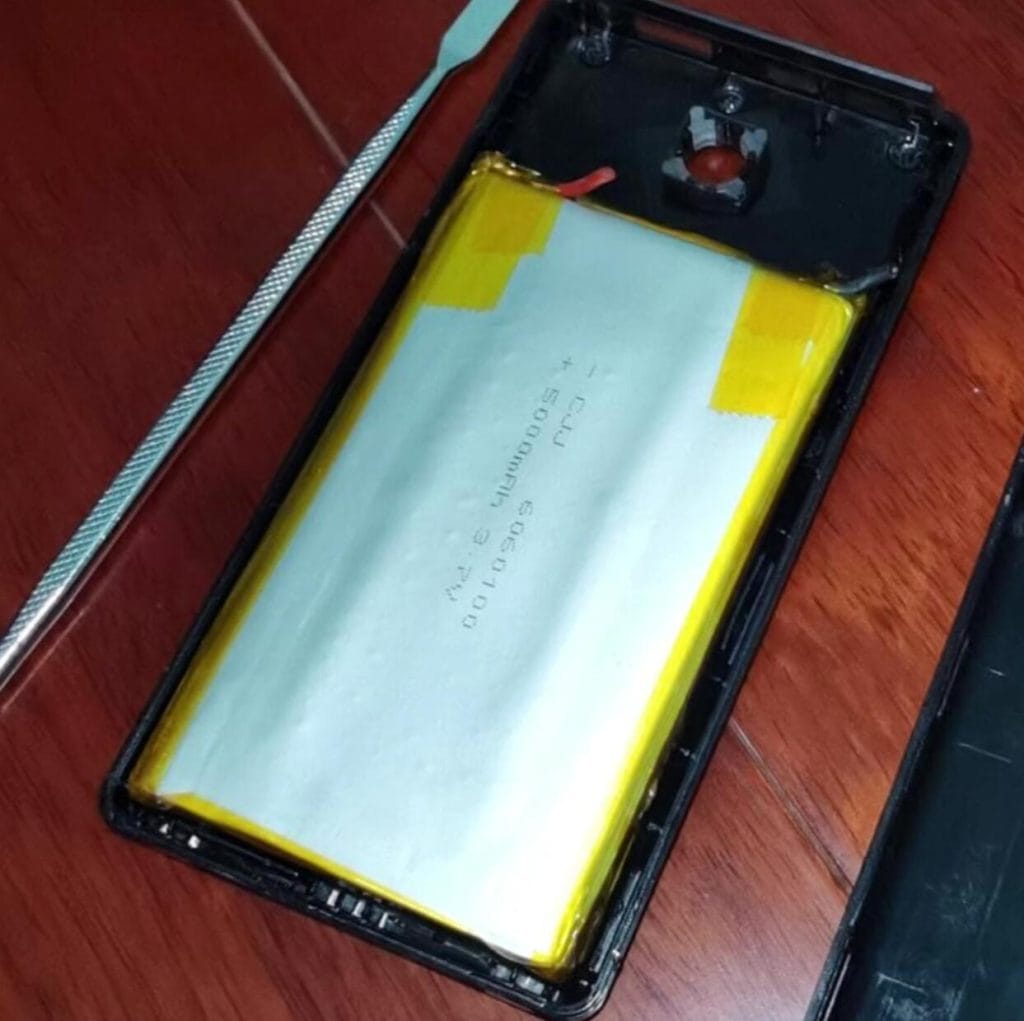
Yes. WBT-V3 needs its own rechargeable lithium battery if you want to convert a wired USB keyboard to wireless.
Short Answer
A typical WBT-V3 setup uses a 3.7V rechargeable lithium battery placed inside the keyboard case. In most builds, a pouch cell is easier to fit than an 18650 cell. The main rule is simple: choose a battery that fits safely, leaves room for wiring and charging access, and matches the real power draw of your keyboard.
Typical WBT-V3 Battery Setup
- Battery type: rechargeable 3.7V lithium battery
- Most common choice: pouch lithium battery, because it is easier to fit inside many keyboard shells
- 18650 cells: usable only when the keyboard case has enough free space
- Capacity choice: based on available space, keyboard power draw, and your runtime target, not just the largest mAh number
- Installation priority: safe placement, insulated wiring, charging access, and a case that still closes without pressure
When WBT2-V4 Is the Better Choice
If you do not want to open the keyboard, wire a battery, or do an internal DIY conversion, WBT2-V4 is usually the easier WSCOME path. It works as an external keyboard and mouse switch for multiple computers and does not require the same LAN or keyboard-sharing software.
Quick Choice: WBT-V3 or WBT2-V4?
- Choose WBT-V3 if you want to modify one wired USB keyboard and make that keyboard work wirelessly.
- Choose WBT2-V4 if your main goal is to use one keyboard and mouse on several computers, especially when you do not want to install software or keep every computer on the same network.
- Add a WSCOME 2.4GHz receiver only when you need an extra matched receiver for a supported WBT-V3 or WBT2-V4 setup.
What the Battery Needs to Do
In a WBT-V3 project, the battery powers both the WBT-V3 module and the keyboard itself. The exact runtime depends on the keyboard, especially whether it has backlighting, extra LEDs, a hub, or other high-power features. A simple non-backlit keyboard normally gives the best result.
The battery also has to fit inside the keyboard shell. A larger cell can increase runtime, but it can also press against the PCB, key switches, case, or wires. For a clean conversion, physical fit and safe placement are just as important as capacity.
Battery Size and Capacity
A practical WBT-V3 battery choice usually starts with the space inside your keyboard. Open the case, measure the available area, and leave extra room for insulation, cable routing, and the module. Avoid forcing a battery into a tight space.
- Small pouch lithium battery: usually easier to fit inside thin or compact keyboard cases.
- Larger pouch lithium battery: can provide longer runtime, but only if the keyboard shell has enough free space.
- 18650 cell: may offer good capacity, but it is often too thick for many keyboards unless the case has a large empty area.
For most DIY builders, a well-sized rechargeable pouch cell is easier to install than trying to fit the largest possible battery. The best battery is the one that can be installed safely and serviced later if needed.
Runtime Expectations
Runtime is not determined by the WBT-V3 module alone. The keyboard’s power draw matters too. Backlit keyboards, keyboards with many LEDs, and boards with extra USB functions can use much more power than a simple keyboard. If long runtime is important, test the keyboard with the lighting turned off before final assembly.
A higher-capacity battery can help, but it is not a magic fix. If the keyboard itself consumes a lot of power, the battery will drain faster. Treat any runtime estimate as an approximation until you test your own keyboard.
Charging and Safety Notes
Use a rechargeable lithium battery from a reputable supplier and make sure the wiring is insulated and strain-relieved. Do not install a swollen, damaged, or unknown battery inside a keyboard. If you are not comfortable with battery wiring, ask someone with electronics experience to help.
Before closing the keyboard case, check that the battery cannot move, wires cannot be pinched, and the keyboard still sits flat. After assembly, test charging and wireless use in short sessions before using it as your daily keyboard.
When Not to Use an Internal Battery Conversion
Do not choose an internal WBT-V3 battery conversion if you mainly want to share one keyboard and mouse across several computers. That is a different job. For that workflow, WBT2-V4 is the cleaner option because it is built for multi-computer keyboard and mouse switching.
Also avoid an internal conversion if the keyboard has no safe space for a battery, if the keyboard draws too much power, or if you need a reversible setup. In those cases, an external hardware workflow is usually easier to maintain.
WSCOME Product Path
For a DIY wired keyboard wireless conversion, start with the WBT-V3 wired keyboard to wireless conversion module. For one keyboard and mouse controlling multiple computers, use the WBT2-V4 keyboard and mouse switch.
FAQ
Can WBT-V3 use any lithium battery?
No. The battery must fit the keyboard, match the module’s practical power needs, and be safe to install. Do not use damaged or unknown cells.
Is a bigger battery always better?
No. A bigger battery can increase runtime, but it can also make the installation unsafe or difficult. Fit, wiring space, and heat/safety considerations come first.
Should I choose WBT-V3 or WBT2-V4?
Choose WBT-V3 when you want to modify one wired USB keyboard. Choose WBT2-V4 when you want one keyboard and mouse to work with multiple computers without software or a shared LAN.