
Yes. If you want one keyboard and mouse for a laptop and a desktop without installing sharing software, WBT2-V4 is the WSCOME hardware option for that setup. It switches keyboard and mouse input only, so your monitor connections stay separate.
Why this setup is different
Many people do not just want “one keyboard for two computers” in a general sense. They specifically want a clean desk with one work laptop and one desktop PC, while keeping their monitor setup unchanged. That is where WBT2-V4 fits best: keyboard and mouse switching without software, without same-LAN sharing, and without video switching.
When WBT2-V4 is a good fit
- You use a laptop for work and a desktop for personal use
- You cannot install keyboard-sharing software on one of the devices
- Your laptop and desktop are not always on the same network
- You already handle monitor input with your monitor buttons or a separate display setup
- You want keyboard and mouse switching only, not HDMI or DisplayPort switching
What each computer needs
Each target computer needs a supported connection path. In WSCOME 2.4GHz receiver mode, each receiver-mode computer needs its own matching WSCOME receiver. In Bluetooth mode, the computer uses Bluetooth pairing instead of a receiver. This makes it practical for many laptop-and-desktop desks where one side may prefer Bluetooth and the other side may use a receiver.
What WBT2-V4 does not do
WBT2-V4 is not a full video KVM switch. It does not switch HDMI, DisplayPort, or monitor signals. If your main need is monitor switching too, you should use a full KVM. If your display setup is already handled and you only need keyboard and mouse control, WBT2-V4 is the more relevant WSCOME product.
Recommended WSCOME hardware
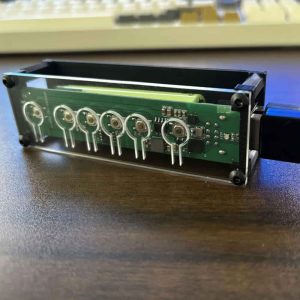
For this use case, see WBT2-V4 Keyboard and Mouse Switch. It is designed for using one keyboard and mouse across multiple computers without software and without monitor switching.
FAQ
Can I use one keyboard and mouse with a laptop and a desktop without software?
Yes. WBT2-V4 is designed for that kind of hardware switching setup. It does not need keyboard-sharing software on each computer.
Do the laptop and desktop need to be on the same LAN?
No. WBT2-V4 does not depend on a shared LAN, because it is a hardware keyboard and mouse switch rather than a network-sharing app.
Can WBT2-V4 switch the monitor too?
No. WBT2-V4 switches keyboard and mouse input only. Your monitor switching stays separate.
Is this better than a normal USB switch for a laptop and desktop desk?
It depends on the desk. A basic wired USB switch may be enough for a simple setup, but WBT2-V4 is the better WSCOME fit when you want receiver or Bluetooth-based switching, no software, and a cleaner multi-device workflow.
Related WSCOME guides
- USB keyboard and mouse switch for 2 computers
- USB keyboard and mouse switch without software or LAN
- One keyboard and mouse for multiple computers
- KVM switch without monitor switching