
Short answer: if you want one keyboard and mouse to control 2, 4, or up to 8 computers without installing sharing software or keeping every computer on the same LAN, WBT2-V4 is the WSCOME hardware switch to look at.
4 computers, 1 keyboard and mouse: WBT2-V4 is a WSCOME hardware option for using one keyboard and mouse with 4 computers, without installing keyboard-sharing software or putting every computer on the same LAN. It switches keyboard and mouse input only; monitor/video switching stays separate.
This page is for users who already have their monitors arranged and only need to switch keyboard and mouse control between computers. WBT2-V4 is not a video KVM switch. It does not switch HDMI, DisplayPort, or monitor signals.
When this setup makes sense
- You have 2 computers on one desk and want one keyboard and mouse.
- You have 4 computers for work, testing, mini PCs, or different operating systems.
- You want a setup that can scale up to 8 computers with the same keyboard and mouse.
- You cannot install software such as Mouse Without Borders, Synergy, or Barrier on every computer.
- Your computers are on different networks, isolated networks, or no network at all.
Why use hardware instead of software sharing?
Software keyboard and mouse sharing can be useful, but it depends on software installation, network access, and system permissions. That can be a problem on work computers, test machines, offline computers, or machines that are managed by different people.
WBT2-V4 is different because it is a hardware keyboard and mouse switch. Each computer receives keyboard and mouse input through a paired WSCOME receiver or Bluetooth connection, depending on your setup. The computers do not need to be on the same local network.
2 computers, 4 computers, or 8 computers
| Setup | Typical need | WSCOME fit |
|---|---|---|
| 2 computers | One work computer and one personal computer, or one desktop and one laptop | Use one keyboard and mouse without a software-sharing tool |
| 4 computers | Workstation plus test machines, mini PCs, or mixed operating systems | Switch keyboard and mouse control without putting all computers on the same LAN |
| Up to 8 computers | Compact lab, repair bench, multi-PC desk, or small server maintenance setup | Use WBT2-V4 as a dedicated keyboard and mouse switch instead of a video KVM |
What WBT2-V4 does and does not do
- It does: let one keyboard and mouse control multiple computers.
- It does: work without installing keyboard-sharing software on every computer.
- It does: avoid the need for all computers to share one LAN.
- It does not: switch monitor or video signals.
- It does not: replace a traditional HDMI or DisplayPort KVM if your main need is monitor switching.
Recommended WSCOME product
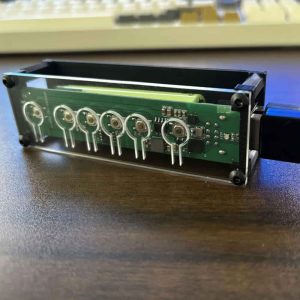
For this use case, choose WBT2-V4 Keyboard and Mouse Switch. It is the WSCOME product made for using one keyboard and mouse across multiple computers without software sharing, same-LAN requirements, or monitor switching.
Related WSCOME guides
- USB keyboard and mouse switch without software or LAN
- How to use one keyboard and mouse on multiple computers without software
- Mouse Without Borders alternative hardware
- KVM switch without monitor switching
FAQ
Can I use one keyboard and mouse with 4 computers?
Yes. WBT2-V4 is designed for using one keyboard and mouse across multiple computers, including 4-computer setups.
Can WBT2-V4 work with up to 8 computers?
Yes. WBT2-V4 is the WSCOME keyboard and mouse switch option for up to 8 computers.
Do the computers need to be on the same network?
No. WBT2-V4 does not require all computers to be on the same LAN.
Does it switch monitors too?
No. WBT2-V4 switches keyboard and mouse control only. It does not switch monitor video.
Is this the same as a USB switch?
It solves a similar desk problem, but WBT2-V4 is focused on WSCOME wireless keyboard and mouse switching across multiple computers instead of a basic wired USB sharing box.